FigCanvasfigcanvas
PricingBlog
Sign inGet started free
← Back to Blog
April 14, 2026· 8 min read

How to Make a Volcano Plot in 3 Minutes (No R, No Python)

Make a publication-ready volcano plot from a CSV in 3 minutes — no R, no ggplot2, no Python. Step-by-step tutorial with AI prompts and 300 DPI export.
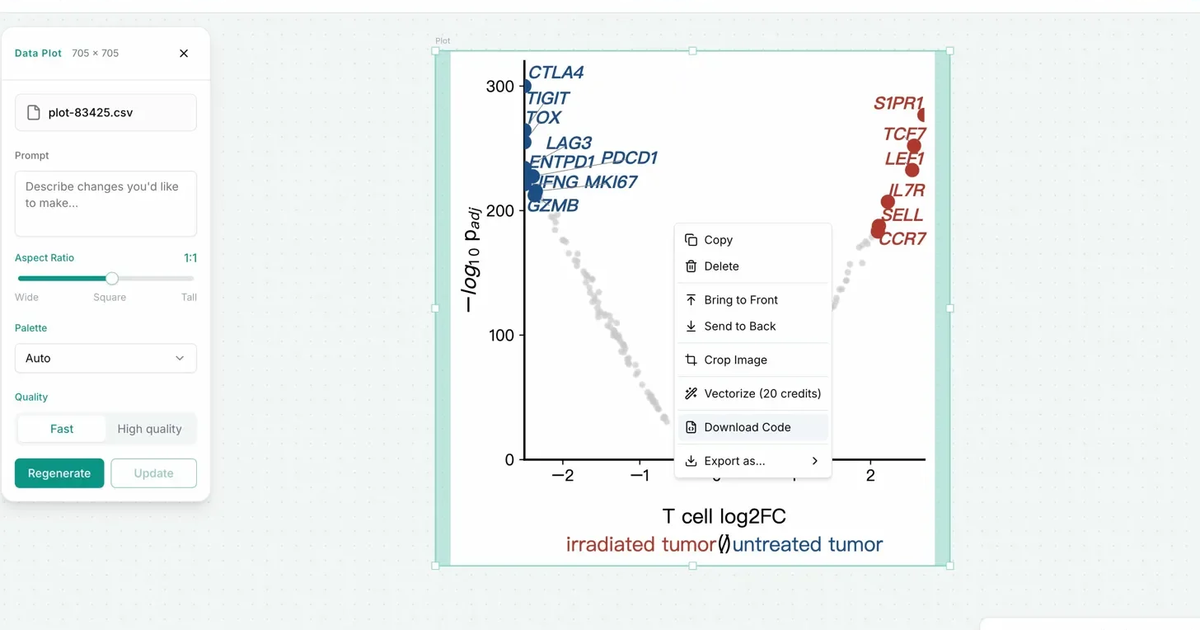
How to Make a Volcano Plot in 3 Minutes (No R, No Python)

Ready to create your first figure?

Describe what you need. Get a publication-ready figure in minutes.

Start creating for free

On this page

  • Pick a variant first — it saves you a rebuild
  • How to make a volcano plot in FigCanvas
  • Step 1 — Drop in your data
  • Step 2 — Pick the chart type and generate
  • Step 3 — Fix what's wrong, then export
  • Mistakes that get flagged in review
  • When to use R and when not to
  • FAQ
  • What is a volcano plot?
  • Can I make a volcano plot without R or Python?
  • How do I make a volcano plot from DESeq2 output?
  • What file formats does FigCanvas accept for volcano plots?
  • Can I customize the colors and labels on my volcano plot?
  • What export formats are available?
figcanvas

AI scientific figure software for researchers. Create scientific illustrations, flowcharts, and data visualizations in one place.

Product

  • Home
  • Tools
  • Pricing
  • Get started
  • Log in

Tools

  • Scientific Illustration
  • Data Visualization
  • Flowchart
  • Volcano Plot
  • Color Palette Generator

Resources

  • Blog
  • BioRender Alternative
  • Contact

Legal

  • Privacy Policy
  • Terms of Service
© 2026 figcanvas. All rights reserved.