
Bland-Altman Plot Generator for method comparison studies
Upload paired measurements from two methods and get a publication-ready Bland-Altman plot with the mean difference (bias), 95% limits of agreement and their confidence intervals. No SPSS, MedCalc or R.
Free account · daily credits included · no credit card
Example result · generated by FigCanvas from this sample data and prompt
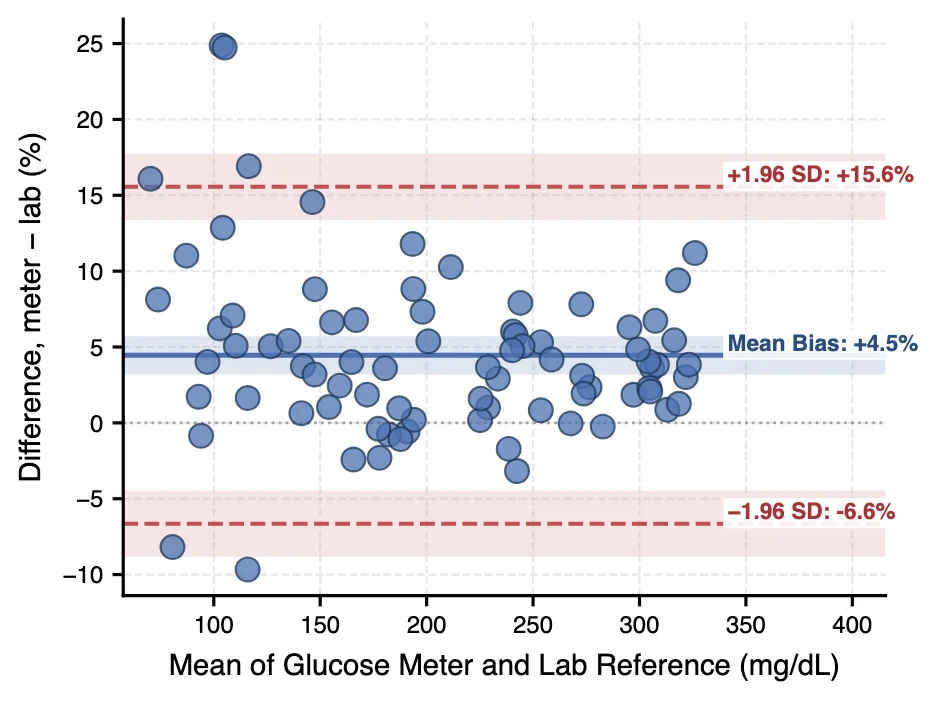
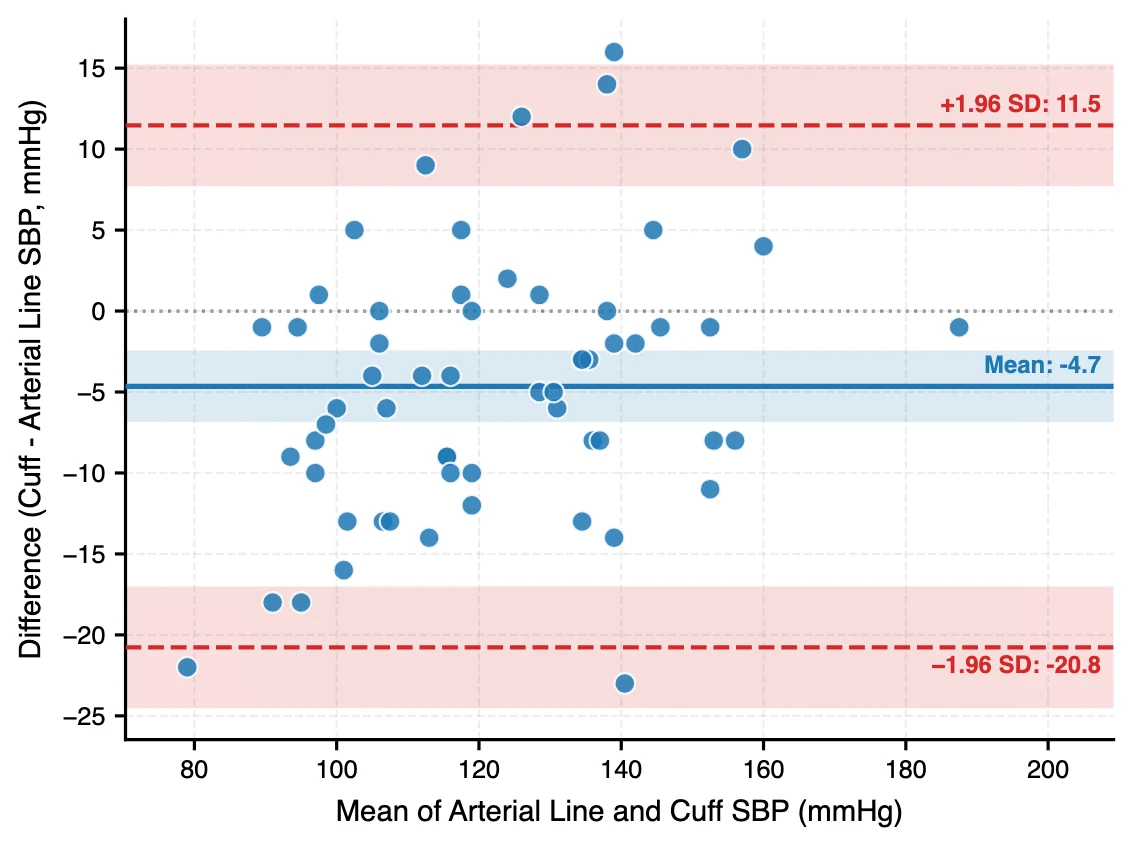
Bland-Altman plot examples
Both figures were generated by FigCanvas from the sample datasets above (simulated measurements) with the prompts shown. The glucose meter reads 4.5% higher than the lab on average, with 95% limits of agreement from −6.6% to 15.6%; the cuff reads 4.7 mmHg lower than the arterial line, with limits from −20.8 to 11.5 mmHg. The shaded bands are the 95% confidence intervals of the bias and each limit.
What a Bland-Altman plot shows
A Bland-Altman plot, also called a difference plot or Tukey mean-difference plot, shows how well two methods of measuring the same quantity agree. For each subject it plots the difference between the two methods against their mean. It was described by Bland and Altman in The Lancet in 1986 and is the expected figure in method comparison and assay validation studies.
How to read the plot
The x-axis is the mean of the two measurements; the y-axis is their difference. The solid line is the mean difference, or bias: how much one method reads higher or lower on average. The dashed lines are the 95% limits of agreement, bias ± 1.96 standard deviations of the differences.
About 95% of differences between the methods are expected to fall between the limits. Whether that range is acceptable is a clinical or scientific judgement, set before the study, not a statistical test.
Patterns to look for
A cloud centred away from zero means systematic bias. A funnel shape, with differences that grow with the mean, means the error is proportional; plot percentage differences or log-transform the data. A sloping cloud means one method has a different scale and the limits of agreement are misleading.
Why not just a correlation?
Two methods can be almost perfectly correlated and still disagree: a meter that always reads 20% high has r close to 1. Correlation measures association, not agreement, which is the point Bland and Altman made in 1986.
Report the bias and limits of agreement, with their confidence intervals, alongside the plot.
Variants
Use percentage differences when the error scales with the measured value. Use a reference method on the x-axis instead of the mean only when one method is a true gold standard. For repeated measurements per subject, the limits of agreement need a correction for within-subject variation.
How to lay out data for a Bland-Altman plot
Use one row per subject or sample, with the two methods side by side. FigCanvas computes the means, differences, bias and limits of agreement.
- subject
- Optional ID for each subject or sample.
- method A
- Measurement from the first method, for example the new device or assay.
- method B
- Measurement of the same quantity from the second method, for example the reference.
- replicate
- Optional. Add when there are several measurements per subject, so repeated measures can be handled.
| subject | lab_reference_mg_dl | glucose_meter_mg_dl |
|---|---|---|
| G01 | 82.3 | 91.9 |
| G02 | 106.6 | 126.3 |
| G03 | 233.3 | 247.8 |
| G04 | 300.4 | 311.4 |
State which method is subtracted from which (for example meter − lab) in the axis label; the sign of the bias depends on it.
How to make a Bland-Altman plot with FigCanvas
Go from paired measurements to a publication-ready figure in four steps.
Upload paired data
Upload a CSV or Excel file with the two methods in two columns, or load a sample dataset.
Choose the comparison
FigCanvas identifies the two methods and suggests the setup: difference direction, absolute or percentage differences, and confidence intervals for the limits.
Generate the figure
Bias, limits of agreement and their confidence intervals are computed in Python from your data and drawn with labelled reference lines.
Refine and export
Change axis labels, units or colors in plain language, then export SVG, PDF or PNG for the paper.
Why researchers make their figures with FigCanvas
Limits computed and labelled
Bias and the 95% limits of agreement are calculated from your data and written next to each line, so the values in the text and on the figure match.
Confidence intervals for the limits
Add the 95% confidence interval of the bias and of each limit of agreement, as recommended for method comparison reports.
Absolute or percentage differences
Switch to percentage or log-ratio differences when the error grows with the measured value.
No SPSS, MedCalc or R
Skip the spreadsheet formulas and statistics packages. Upload two columns and get the figure.
Bland-Altman plot FAQs
A Bland-Altman plot compares two measurement methods. Each point is one subject: the x-axis is the mean of the two measurements and the y-axis is their difference. Horizontal lines mark the mean difference (bias) and the 95% limits of agreement (bias ± 1.96 SD).
Check the bias line for systematic over- or under-reading, then the limits of agreement for how far individual measurements can differ. Look for patterns: a funnel shape suggests proportional error and a slope suggests a scale difference between methods. Whether the limits are acceptable depends on a clinically relevant threshold set in advance.
Compute the difference for every pair, then the mean (bias) and standard deviation (SD) of the differences. The 95% limits of agreement are bias − 1.96 × SD and bias + 1.96 × SD.
Use absolute differences when the spread of differences is constant across the measurement range. If the differences grow with the mean, use percentage differences or log-transform the data before plotting.
Correlation measures whether two methods rise and fall together, not whether they give the same value. A method with a constant 20% bias can still have a correlation near 1. The Bland-Altman plot shows the actual size of the disagreement.
Add two columns: the mean of the two methods, (A + B) / 2, and their difference, A − B. Compute the bias with AVERAGE of the differences and the standard deviation with STDEV.S; the limits of agreement are bias ± 1.96 × SD. Plot the means against the differences as a scatter chart and add three horizontal lines. The FigCanvas Bland-Altman plot generator does all of this from the two columns.
In R, use bland.altman.plot() from the BlandAltmanLeh package or the blandr package. In Python, statsmodels has sm.graphics.mean_diff_plot(a, b). In GraphPad Prism, enter the two methods as columns and run the Bland-Altman analysis from the column analyses. Without any of these, upload the two columns to the FigCanvas Bland-Altman plot generator.
There is no universal cut-off: set the acceptable difference before the study from clinical requirements. Standards give examples. ISO 15197:2013 requires 95% of blood glucose meter results to be within ±15 mg/dL of the reference below 100 mg/dL and within ±15% at or above 100 mg/dL. For blood pressure devices, the AAMI/ISO 81060-2 criterion is a mean difference of no more than 5 mmHg with a standard deviation of no more than 8 mmHg.
You can sign up for free and make figures with the free daily credits. Free exports are watermarked PNG; Pro and Credit Pack users export editable SVG and 300 DPI PDF, ready for journal submission.
Make a Bland-Altman plot from your measurements
Upload paired measurements and get the bias, limits of agreement and a publication-ready difference plot in about a minute.
More AI tools for scientific figures
View all tools →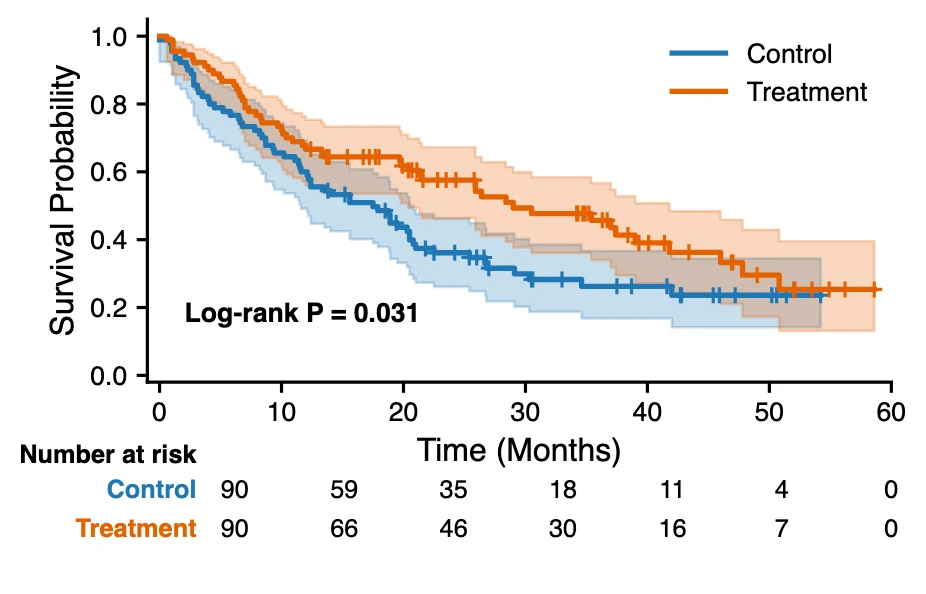
Kaplan-Meier Curve Generator
Kaplan-Meier survival curves with censoring marks, log-rank test and a number-at-risk table from time-to-event data.
Open tool →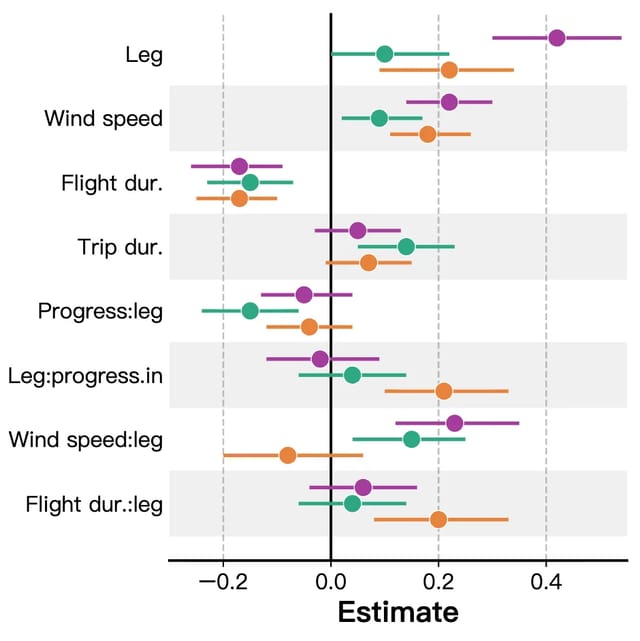
Forest Plot Maker
Forest plots for meta-analysis, systematic reviews and regression results with confidence intervals.
Open tool →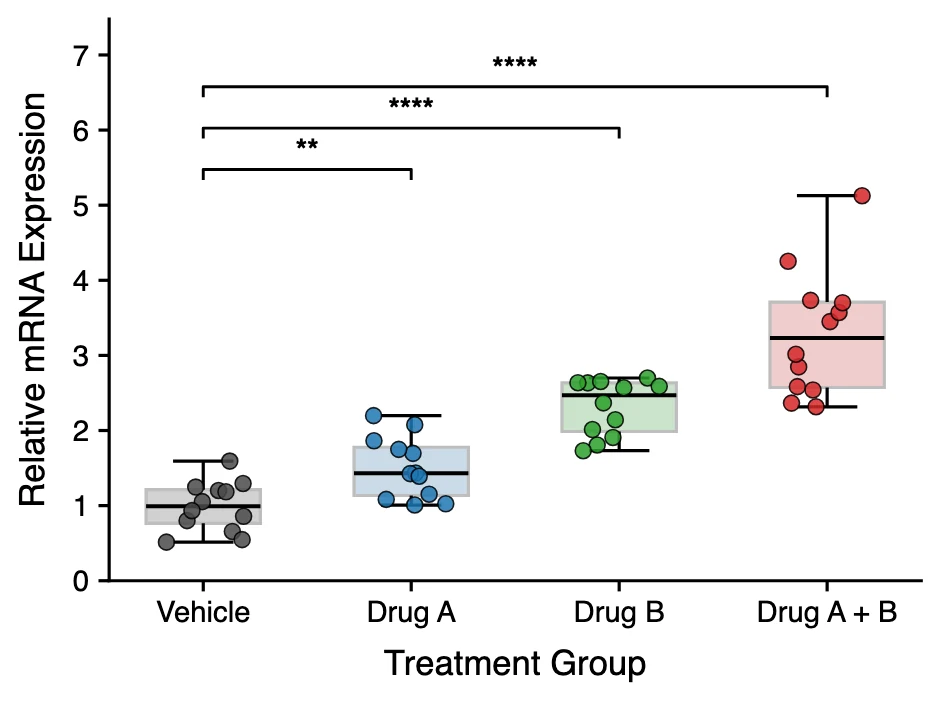
Box Plot Maker
Box and whisker plots with individual data points and significance brackets computed from your data.
Open tool →